

Introduction – Your New Content Superpower
Real‑estate success lives on social, and AI Content Creation lets you seize the moment without breaking stride. From your Roomvu dashboard you can dream up a hyper‑local topic, flip it into a polished video or slideshow, tack on a selfie intro for personality, and schedule it—all before your coffee cools. No editing software, no file juggling, just a seamless 10‑second workflow that turns ideas into lead‑magnet posts.
1. Meet Your On‑Demand Studio
Every market, every client base, every listing is unique—so why settle for one‑size‑fits‑all content? AI Content Creation places a virtual production crew at your fingertips:
- Cover any angle – Break down policy changes, showcase neighborhood coffee spots, or spotlight exclusive listings.
- Stay hyper‑local – Tailor clips to zip‑code‑level stats or school districts your followers care about.
- Mix formats – Quick slideshow carousels for swipe‑happy scroll‑ers, full videos for storytelling.
Because you choose the topic and format, no two agents deliver the same feed. Your voice cuts through the noise—and your audience knows you “get” their market.
2. Why It’s Revolutionary
- Speed – Idea‑to‑publish in 10 seconds keeps you topical.
- Ease – No technical hurdles; the AI writes, edits, and schedules.
- Brand control – Consistent colors, fonts, and logo placement keep every post on‑brand.
- Intros = impact – Agents who attach selfie intros via AI Content Creation enjoy up to 10× more engagement, quadruple watch‑time, and six‑times higher share rates.
The result? A content engine that feels human, looks pro, and runs on autopilot.
3. Step‑by‑Step: From Idea to Post
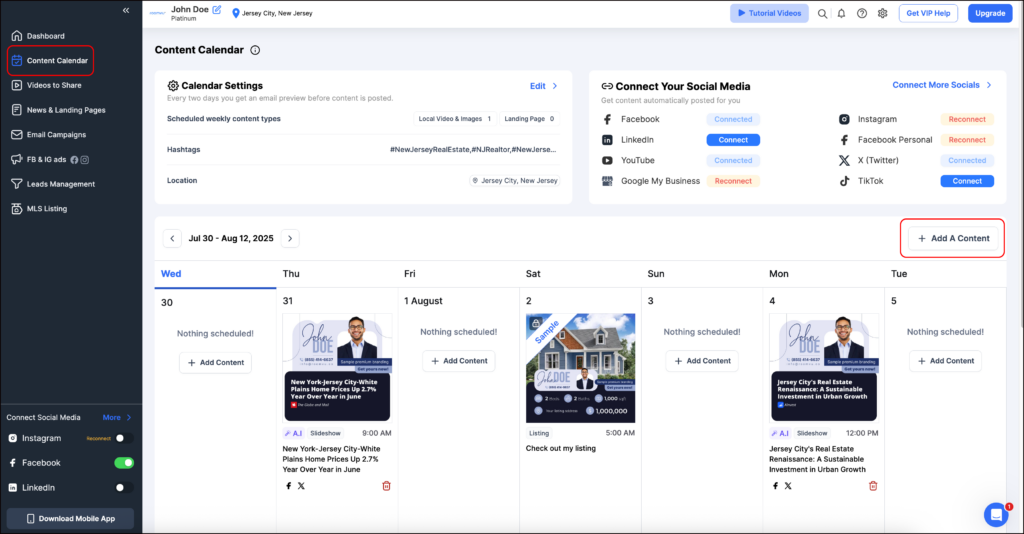
- Open your Content Calendar
Navigate to your Roomvu dashboard and click “Content Calendar” on the left‑hand menu. - Hit “Add Content”
Find the blue “Add Content” button at the top‑right corner of the calendar view and click it.

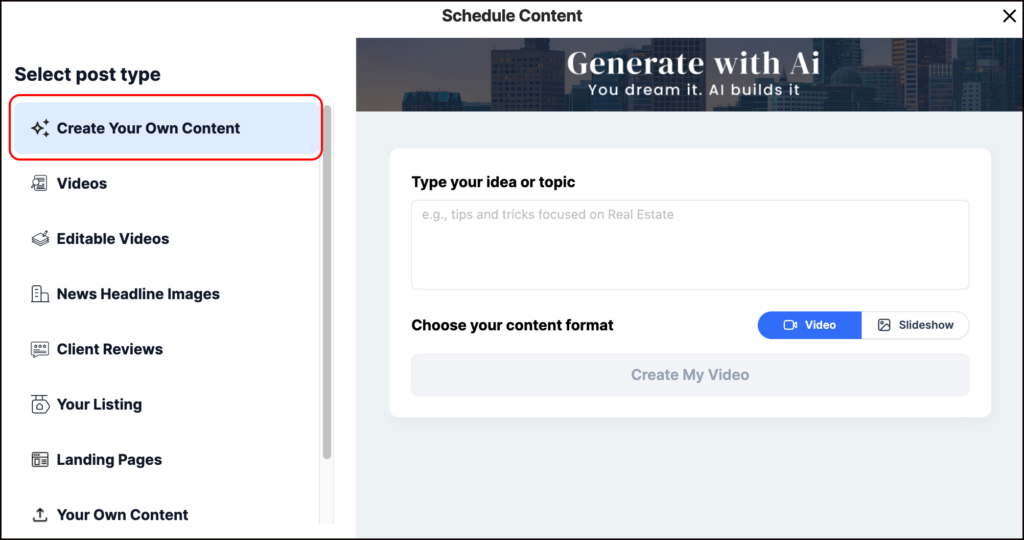
- Choose “Create Your Own Content”
In the pop‑up, pick the first option on the left labelled “Create Your Own Content.”

- Type Your Topic or Idea
Enter anything—from “April condo prices in Kitsilano” to “5 staging tricks that cost under $100.” The AI can handle broad or niche prompts.

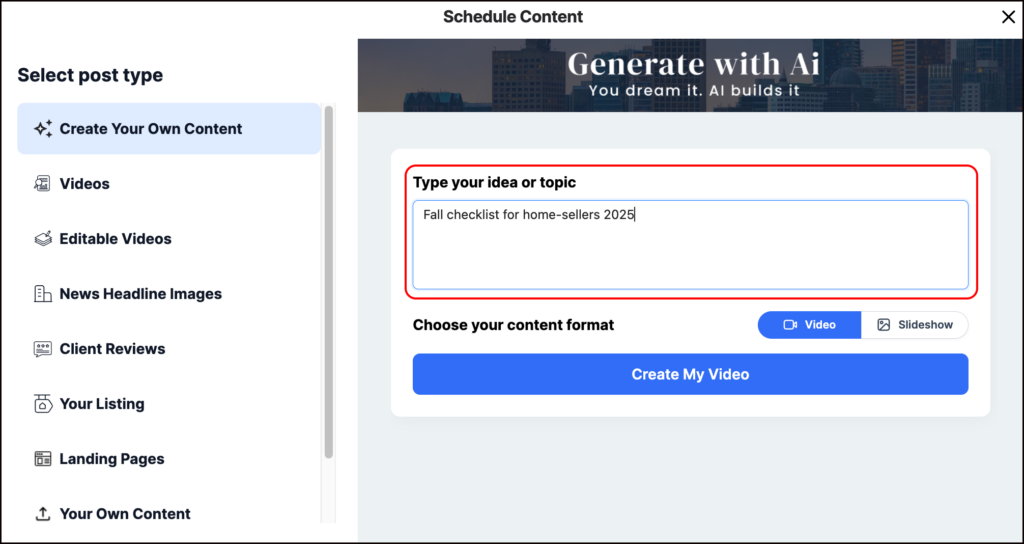
- Select Your Format
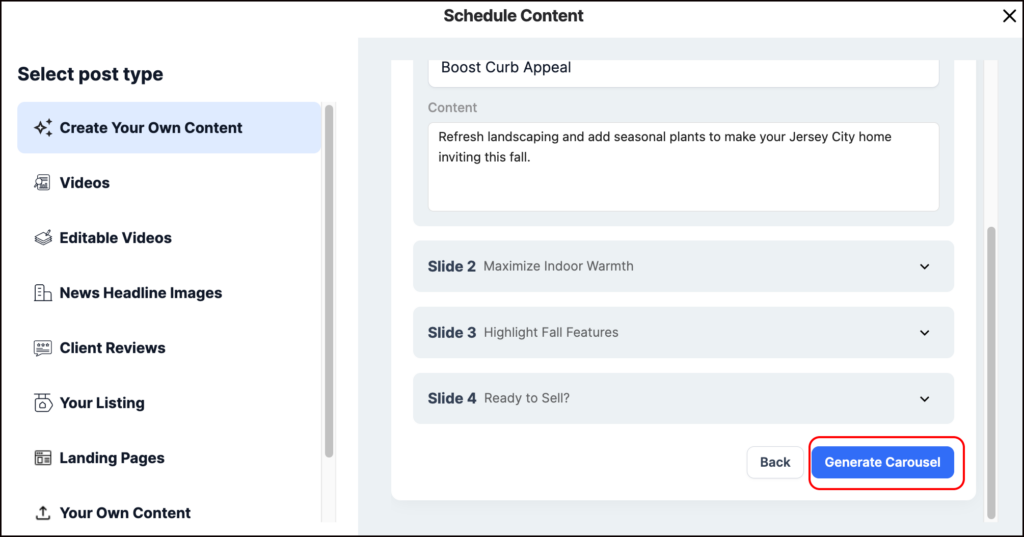
Decide between Video (ideal for storytelling) or Slideshow Carousel (perfect for step‑by‑step tips). - Create Content
hit “Create My Video,” or “Create My Slideshow,”and pat yourself on the back—the post is queued and ready to roll. See the details of the slides or videos in the next step and once your are happy click “Generate video” or “Genrate Carousel” and done!

4. Face‑Forward Intros: The Engagement Multiplier
Algorithms crave authentic faces. A selfie intro delivered through AI Content Creation stops thumbs mid‑scroll, signals trust, and sets your clip apart from cookie‑cutter market updates. Our data shows:
- 1,000 % engagement lift versus text‑only reels
- 4× longer average watch‑time
- Increased inbound DMs as viewers feel they “know” you
Keep the intro tight (under 10 seconds), smile, mention the value they’re about to get, and let roomvu’s engine handle the merge.
Read this article to learn how to add an intro to your videos:
Add Personal Intro Videos to Your Social Media Content
5. Slide‑Show Carousels: Swipe‑Able Storytelling
Sometimes video isn’t necessary—think before/after remodels, quick stat bursts, or multi‑step checklists. Choose Slideshow Carousel and AI Content Creation auto‑generates branded images, overlays concise captions, and schedules the post. Perfect for:
- Mini neighborhood tours (each slide = one hotspot)
- Cost breakdowns (slide per expense)
- “3 Mistakes Sellers Make” series
Your feed stays varied and visually fresh without extra effort.
6. Content Prompts to Try Tonight
- Breaking News: “Explain today’s Fed rate decision for first‑time buyers.”
- Hyper‑Local Stats: “3‑slide recap: median price change in River Oaks this month.”
- Lifestyle: “Top dog‑friendly patios in downtown Tampa.”
- Education: “Video: Adjustable vs. fixed mortgages simplified.”
- Seasonal: “Fall checklist for home‑sellers 2025.”
Drop the prompt, select format, and AI Content Creation handles the rest—color‑grading, captions, and scheduling included.
Final Words – Own Every Feed
Consistency beats luck. With AI Content Creation baked into your Roomvu dashboard, your next viral post is always 10 seconds away. Pair smart topics with selfie intros, schedule a week’s content in one sitting, and turn your social presence into a round‑the‑clock lead engine—no technicians, no pricey editors, just you and your brand in every scroll.